
You want to use a CoinCard?
On every CoinCard, you see a simple 2-step process to ensure that the coins you purchased are safely transferred to your business account.
First-time buyers, please check the prerequisites below.
1) Be Logged In
Log in to ensure you and your corporate account receive the coins you purchased.
2) Scan the QR Code
The QR code you received is unique and can only be used once. The AgenticBlue will check the card and transfer the amount of ColdCoins to your company account.
Check your coins
Go to the Coins section to see the record entry for the new coins.
DONE
Important for first-time users
Make sure you have a company account
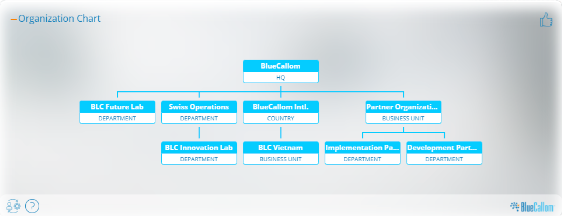
BlueCallom is a business solution. It assumes you have a company. When you set up a company for the first time, an organizational structure is created with just the HQ organization. You can add additional departments, entire business units, and country organizations with their own departments. If you have multiple departments and business units, each can purchase and manage its own coin budgets. This makes it easy for an enterprise from day one. You can also use it for cost accounting and other reasons.
Make sure your account is connected to your company account.
You must either have a verified email domain that matches your company’s domain or the company must invite you as an authenticated user. Go to your personal profile in “My Portal”. You will see if you’re connected or need to connect right at the top tile.