

GPTBlue Stardust Release Part 2: No-Code Survey Prompt and Agent
GPTBlue Stardust Release Part 2: No-Code Survey Prompt and Agent
 Welcome to GPTBlue Stardust Part 2. With the introduction of our no-code strategy, we started with a no-code custom model feature that makes clear how far no-code can go and supersede any kind of programming language, also in the future. And part of the Stardust Release is also the first prompt that will advance to a powerful multiagent application.
This new Survey Prompt / Agent is a revolutionary feature set to transform the way organizations gather and process feedback. This feature is also part of another, broader vision of ours: GPTBlue Agents. Leveraging our cutting-edge Agent Architecture to streamline and enhance surveys in general is just the first step. Our future Neuro Agents continue our effort in the Neuro-AI-Fusion research and development work.
Ushering in the GPTBlue Agent Era
The Survey Prompt and Agent are just the beginning of a new era in agent design. Although we’re in the early stages and will announce our full Agent Technology in the coming weeks, the survey prompt serves as a Trailblazer, showcasing the potential of our new architecture.
Agent 001 – For surveys done right.
Conducting internal surveys to seek inputs for increasing efficiency has been done for decades with only medium to no success. Great successes are rare across industries and countries. One of the biggest challenges are the way teammates articulate a problem, sharing it and how it can be turned into something valuable. Moreover, there are conflicting understandings and conflicting perspectives. Thousands of feedback have been given but it was too hard to make sense out of it. Individual interviews in a company with 1,000 employees and hundreds of issues would generate hundreds of thousands of hard to read feedback.
Agent 001 is a prompt/agent that can be given to hundreds or thousands of employees with a question like “What are the most boring and time consuming jobs that you would like to give to an AI?”. The response handling of GPTBlue is now profoundly different. It tries to understand the response in the context of the tasks, and shows its understanding back to the user. The user is asked if what the GPTBlue understood is right. If not, the user edits the response of the AI and returns it again. The iterative process can go on for a few more times until the user gives up on himself or the final response from GPTBlue is accepted. The response is not only the understanding but a structured content that can easily be compared with and assessed against thousands of other feedback. This is something that could have never been done before with freeform surveys. But only a free form can return a real problem that may have been completely unknown.
The name Agent 001 signifies that it is the first task any employee should undertake before any AI strategy is even formed.
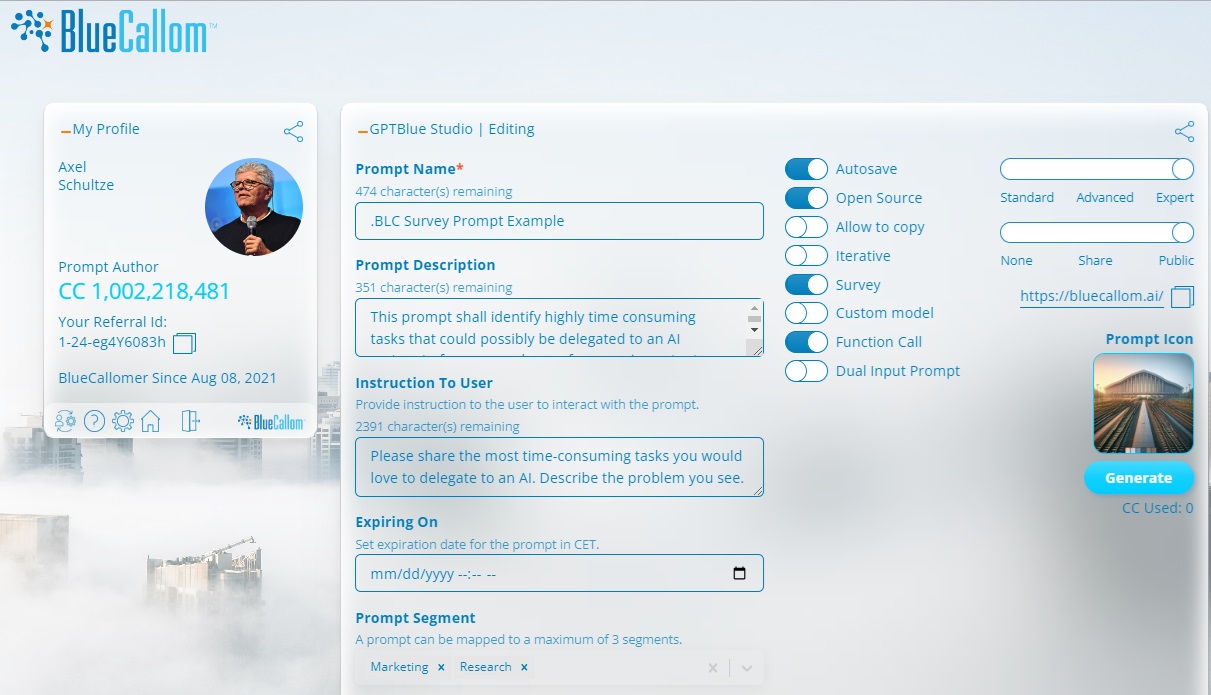
Like in Part one of the announcement blog post, the Survey Prompt can be selected by a switch and be “programmed” like a prompt in natural language. No coding needed.
The power is in the background when survey responses are evaluated by an AI.
How the Survey Agent Works
The Survey Prompt is a sophisticated, chained BluePrompt that combines human-stimulated and autonomous prompts. It also utilizes function calls for complete execution, ensuring a seamless and efficient process. Here’s a step-by-step look at how it works:
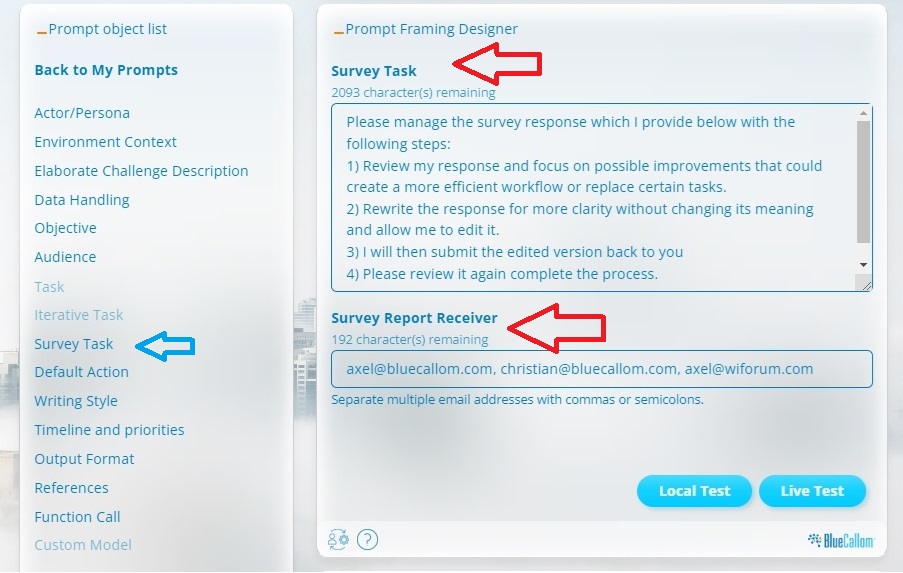
Those who are familiar with GPTBlue know that each prompt object has a specific functionality in the prompt. Here it is the selected Survey Task functionality (blue arrow).
The survey task is “programmed” with No-Code in natural language (English, French, Italian, German, Vietnamese… and many other languages). Two internal prompts handle the process as you see the process below. A second field asks for the manager who will receive the survey report, processed by yet another autonomous prompt.
- Initial Feedback Request: The first prompt component asks employees for their feedback.
- Feedback Review: The second prompt component reviews the feedback received.
- Clarification Check: The third component asks users if their feedback has been correctly understood.
- Iterative Feedback Editing: Users can edit their feedback in an iterative manner (BluePrompt).
- Revised Feedback Review: The fourth component reviews the edited feedback and asks if it is now correct.
- Feedback Loop: This process repeats until the feedback is satisfactory.
- Storage for Processing: The fifth component stores the final feedback for later processing with another agent.
- Email Notification: The sixth component (prompt) crafts an email and sends it via function call to a designated survey manager.
- Further Processing: The seventh component stimulates another agent to assess all incoming survey responses, guiding the process to an AI-generated solution that eventually is built by approximately 5 agents and 30+ internal prompts within the agents.
- No-Code allows prompts to interact with humans at any given point of time. The human actors stay in control whenever desired. This makes no-code agents as close to humans or as autonomous as the agent users want – not the developer, unless it is suppressed.
No-Code Survey Agent: Available Now
The No-Code Survey Agent as described above is available now. It is another BluePrompt that would not work on conventional GPT systems due to its sophistication. However, it requires no programming skills and can be used out of the box. Just select “Survey Prompt” on, and you can use that prompt/agent like other BluePrompts already do.
To experience the benefits of the No-Code Survey Agent firsthand, try out our test agent and see how it can restructure your internal feedback processes.
From Prompt to Agent
You just experienced the smooth and gradual path from prompt to agent. The first prompt of that kind was already introduced on Feb 8, when we launched GPTBlue. At that point, Agents were not widely understood so we called them “BluePrompts”.
New Prompt / Agent Functionality
New Prompt Default Action Instruction Feature
As prompts and agents become more sophisticated, we’ve added a feature allowing prompt authors to provide descriptions and guidance on how users should interact with the prompts or agents. This is done in the GPTBlue Studio during development, ensuring that users receive clear instructions alongside the prompt name, and description in the GPTBlue AI user interface.
New Prompt and Agent Segmentation
After extensive research and user feedback, we’ve completed the business segmentation for prompts. Any prompt can now be classified into up to three segments, such as Management, Marketing, or Finance. This classification is also handled by the prompt or agent author in the GPTBlue Studio.
In the Main Library on the GPTBlue Home, users can search for specific business segments, making it easier to find solutions that match their needs. We encourage all prompt authors to update their prompts accordingly and take advantage of the Prompt Doctor—a library tool that enhances prompt content.
SUMMARY
BlueCallom’s GPTBlue Stardust release is the start of a new era of agent development. Several of our “BluePrompts” were designed like agents but simple enough to easily handle it with no description. Prompt engineers who built highly complex agents needed to code those agents. For us who are committed to ‘no-code’, it took and takes a bit more effort to make no-code agents for any situation. Keep watching our updates.
PART 1 and 3
In part 1, you can read about the new custom data model functionality
In part 3, you can read about our new “In-App-Feedback” the upcoming Enterprise Edition and more features of this release.
BUSINESS MODEL
You may want to create your own full version account. It is free and based on our business model it will remain free. This allows you to scale at enormous speed and not worry about excess license fees. You will receive enough CallomCoins for free to pay for usage. As you use it more often you only purchase coins to pay what you use it for.


Leave a Reply
Want to join the discussion?Feel free to contribute!